Exports and files
Exports are in the Export workspace. Choose a kind, check its settings, and press Export. It opens on the Printable PDF, the pages to print and stitch from.
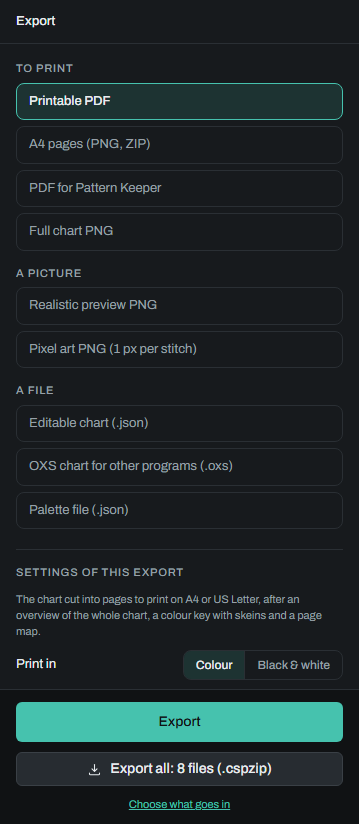
The kinds of export
| Kind | What you get | File |
|---|---|---|
| Printable PDF | The chart cut into pages to print on A4 or US Letter, in one PDF. It opens with the whole chart on one page as a picture, without symbols, then the colour key with the skeins each thread needs, then a map of the pages. | name_A4_color.pdf, name_Letter_bw.pdf and so on |
| A4 pages (PNG, ZIP) | The same A4 pages as pictures, one file for each page, in a ZIP. | name_A4_color.zip or name_A4_bw.zip |
| PDF for Pattern Keeper | A PDF made to be read by the Pattern Keeper app, with a simple and an extended key. | name_patternkeeper.pdf |
| Full chart PNG | The whole chart as one picture, with its symbols. | name_color.png or name_bw.png |
| Realistic preview PNG | A picture of the finished piece, stitched. | name_preview.png |
| Pixel art PNG (1 px per stitch) | One pixel for each stitch, in its thread's colour. | name_pixels.png |
| Editable chart (.json) | Everything in the chart, to open here again. The same as Save to file. | name_editable.json |
| OXS chart for other programs (.oxs) | The chart in the format other cross stitch programs read. | name.oxs |
| Palette file (.json) | The chart's threads, to load as a palette in another chart. | name_palette.json |
name is the chart's name in lower case, with hyphens for spaces: Adorable Little Chart gives
adorable-little-chart_editable.json. The editable chart, the palette and the pixel art are made in your browser; the rest, the OXS
file among them, are made on the site's server, which can take a little while for a big chart. While one runs, the Export button shows how
far it has got; when it is done, a line under it names the file that was downloaded.
Export all makes one bundle (.cspzip) with the editable chart and the exports you list for it: at first the OXS
chart, the colour and black-and-white chart pictures, the realistic preview, the PDF for Pattern Keeper and both sets of
A4 pages. It can be opened here again, like the editable chart. See Saving and your account.
Choosing what Export all makes
Export all's button says how many files the bundle holds. Press Choose what goes in, under it, or open Preferences and go to Export all. The editable chart is always included. Below it is one line for each export:
- Add an export adds a line, starting from your export settings as they are now. Choose its kind, and for a printed kind whether it prints in colour or black and white.
- Each line names its kind with its settings in short under it. Change opens the line: its kind, and only the settings that kind uses (paper, printed stitch size, overlap, fabric margin, or the canvas in the preview). A setting you have not changed on the line follows your export settings.
- A kind can be listed more than once with other settings: a colour PDF and a black-and-white one, or the same PDF at
two stitch sizes. Files that would have the same name get the setting they differ in added, such as
name_A4_color_8mm.pdf. - Remove takes a line out; Back to the default list puts the first list back.
The list is kept in this browser, with your other preferences. A kind not available to you cannot be added; if one is already in the list, Export all leaves it out and says so under the button.
Settings
The settings shown depend on the kind:
- Print in, Colour or Black & white: for the printable PDF, the A4 pages, the PDF for Pattern Keeper and the full chart PNG.
- Paper, A4 or US Letter: for the printable PDF. The A4 pages are always A4.
- Printed stitch size, mm: how big one stitch is printed on the printable PDF and the A4 pages, from 2 to 12 mm. It starts at 5.5. The symbols and lines grow with it.
- Page overlap, stitches: how many rows and columns of stitches each page repeats from the page beside it, so you can find your place. Choose 0, 3, 5 or 10; it starts at 5. A line under it says how many pages the export will have.
- Fabric margin: spare cloth on every side of the stitching, for a hoop or for framing: none, or 2.5, 5 or 7.5 cm (1, 2 or 3 in when sizes are in inches). With a margin, a line under it says the fabric to buy, and the pages' details say it too.
- Canvas in exported preview: for the realistic preview, draws the fabric under the stitches, in the stitch texture chosen for the view. See Chart views.
- Author name: printed on the charts as "by name", and written into the OXS file. It is the same name as in your Preferences.
The paper, the printed stitch size, the overlap, the fabric margin and the author name are also in your Preferences, and this browser remembers them. The finished size printed on the charts comes from the chart's fabric count.
What each keeps
- Backstitch is drawn on the printable PDF, the A4 pages and the full chart PNG, each thread in a line style of its own, and kept in the OXS file. The PDF for Pattern Keeper has none on its chart pages.
- Half stitches are drawn as halves on the printable PDF, the A4 pages and the pictures. The PDF for Pattern Keeper and the OXS file turn them into whole stitches. See Backstitch and stitch types.
- Layers: only the editable chart keeps them. Every other export uses what you see: the top stitch of the layers that are shown. See Layers.
When an export is refused
A greyed-out kind is not available to your account; a kind you can't use at all is not listed. If the server is busy, the message says how long to wait. See Limits and messages.